现象
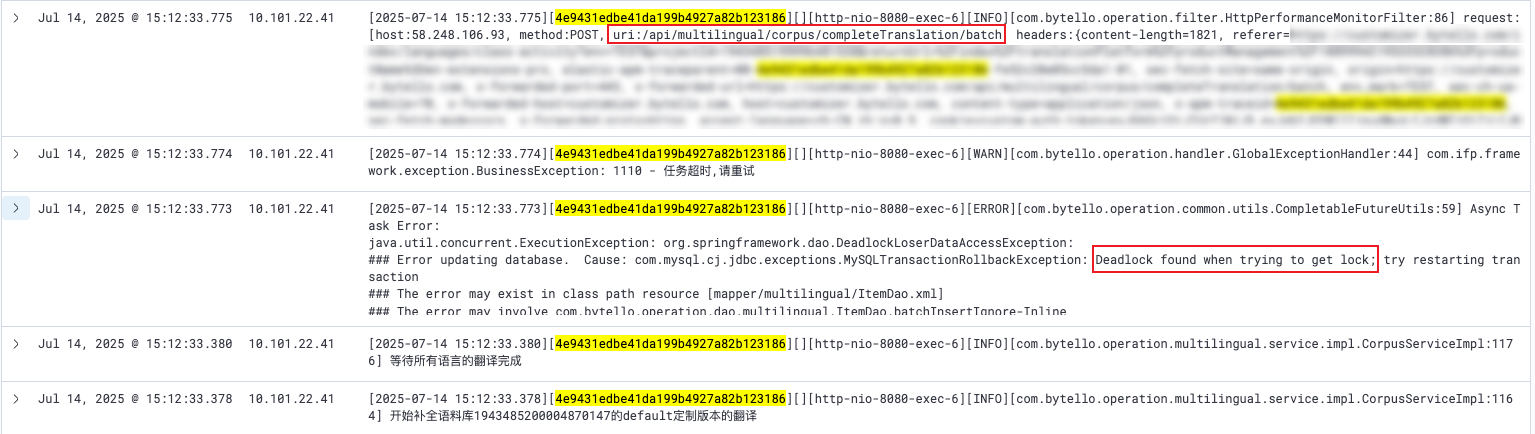
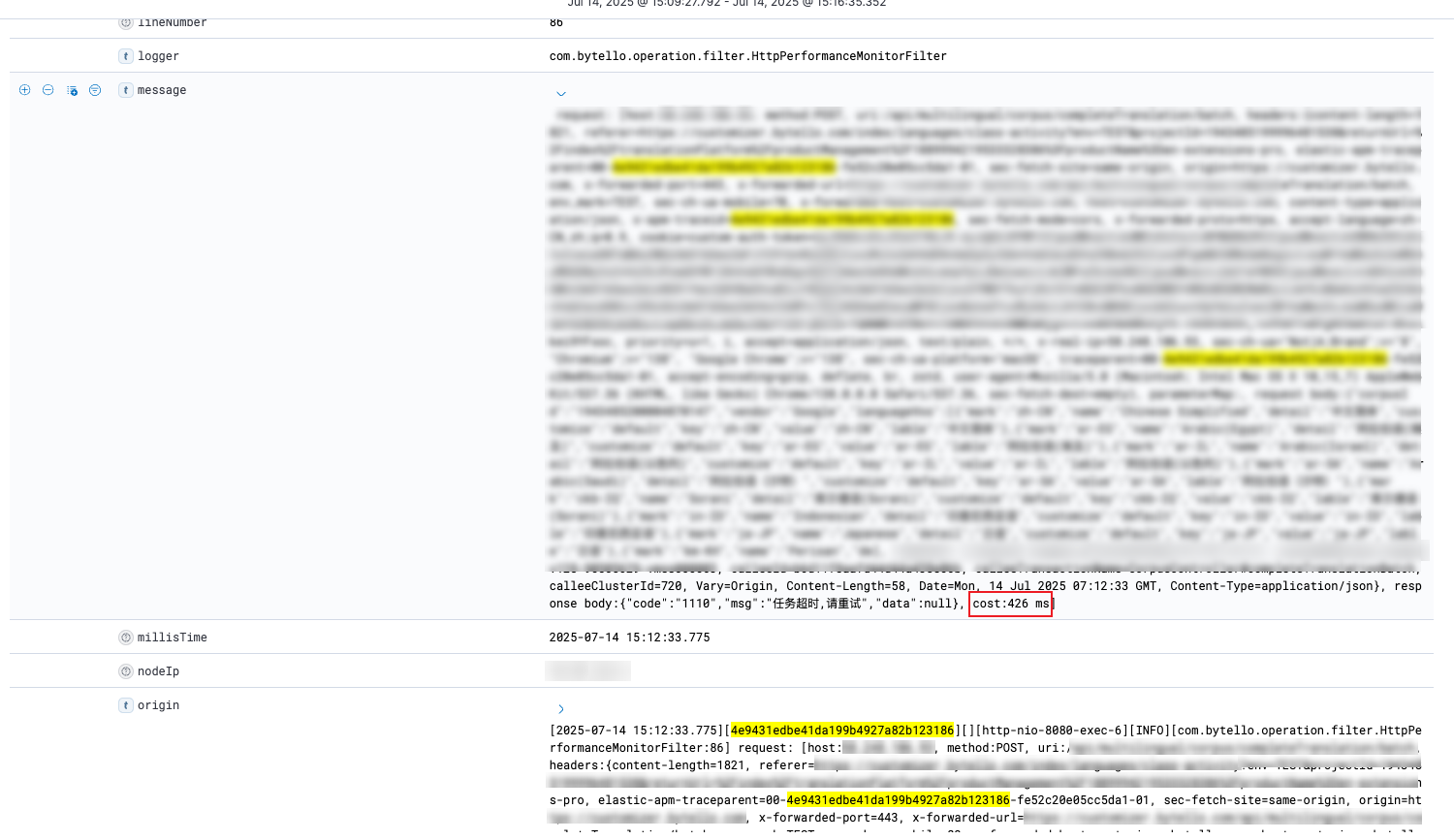
补全翻译接口(填充空白的语料)接口执行失败,MySQL 检测到死锁快速抛异常,接口执行耗时 426ms。
无论是从接口、具体表现、根因,都与上个问题有明显区别。
分析
1、查看死锁日志,可以看到有两个事务,是对同一个项目的不同语言的批量插入更新操作(INSERT ON DUPLICATE KEY UPDATE)。
------------------------
LATEST DETECTED DEADLOCK
------------------------
<timestamp> <os_thread_hex>
*** (1) TRANSACTION:
TRANSACTION <trx_1>, ACTIVE 0 sec inserting
mysql tables in use 1, locked 1
LOCK WAIT 6 lock struct(s), heap size 1136, 4 row lock(s)
MySQL thread id <tid_1>, OS thread handle <handle_1>, query id <qid_1> <private-ip> <db_name> update
INSERT INTO multilingual_item (item_id, corpus_id, lang, customize,`key`,value, status, type) VALUES

            (<item_id_1>, <corpus_id>, 'my-MM', 'default', '下一步', '',
            0, 1)
         ,
            (<item_id_2>, <corpus_id>, 'my-MM', 'default', '分组竞争', '',
            0, 1)
         ,
            (<item_id_3>, <corpus_id>, 'my-MM', 'default', '判断对错', '',
            0, 1)
         ,
            (<item_id_4>, <corpus_id>, 'my-MM', 'default', '完成', '',
            0, 1)
         ,
            (<item_id_5>, <corpus_id>, 'my-MM', 'default', '球球拼词', '',
            0, 1)
         ,
            (<item_id_6>, <corpus_id>, 'my-MM', 'default', '知识排序', '',
            0, 1)
         ,
            (<item_id_7>, <corpus_id>, 'my-MM', 'default', '知识配对', '',
            0, 1)
         ,
            (<item_id_8>, <corpus_id>, 'my-MM', 'default', '记忆卡片', '',
            0, 1)
         ,
            (<item_id_9>, <corpus_id>, 'my-MM', 'default', '试玩', '',
            0, 1)
         ,
            (<item_id_10>, <corpus_id>, 'my-MM', 'default', '超级分类', '',
            0, 1)
         ,
            (<item_id_11>, <corpus_id>, 'my-MM', 'default', '趣味分类', '',
            0, 1)
         ,
            (<item_id_12>, <corpus_id>, 'my-MM', 'default', '趣味选择', '',
            0, 1)
         ,
            (<item_id_13>, <corpus_id>, 'my-MM', 'default', '返回', '',
            0, 1)
         ,
            (<item_id_14>, <corpus_id>, 'my-MM', 'default', '选词填空', '',
            0, 1)

        ON DUPLICATE KEY UPDATE status = IF(value = '', VALUES(status), status), value = IF(value = '', VALUES(value), value)
*** (1) WAITING FOR THIS LOCK TO BE GRANTED:
RECORD LOCKS space id 345 page no 93049 n bits 144 index PRIMARY of table `<db_name>`.`multilingual_item` trx id <trx_1> lock_mode X insert intention waiting
Record lock, heap no 1 PHYSICAL RECORD: n_fields 1; compact format; info bits 0
 0: len 8; hex 73757072656d756d; asc supremum;;

*** (2) TRANSACTION:
TRANSACTION <trx_2>, ACTIVE 0 sec inserting
mysql tables in use 1, locked 1
7 lock struct(s), heap size 1136, 4 row lock(s)
MySQL thread id <tid_2>, OS thread handle <handle_2>, query id <qid_2> <private-ip> <db_name> update
INSERT INTO multilingual_item (item_id, corpus_id, lang, customize,`key`,value, status, type) VALUES

            (<item_id_a1>, <corpus_id>, 'ar-EG', 'default', '下一步', '',
            0, 1)
         ,
            (<item_id_a2>, <corpus_id>, 'ar-EG', 'default', '分组竞争', '',
            0, 1)
         ,
            (<item_id_a3>, <corpus_id>, 'ar-EG', 'default', '判断对错', '',
            0, 1)
         ,
            (<item_id_a4>, <corpus_id>, 'ar-EG', 'default', '完成', '',
            0, 1)
         ,
            (<item_id_a5>, <corpus_id>, 'ar-EG', 'default', '球球拼词', '',
            0, 1)
         ,
            (<item_id_a6>, <corpus_id>, 'ar-EG', 'default', '知识排序', '',
            0, 1)
         ,
            (<item_id_a7>, <corpus_id>, 'ar-EG', 'default', '知识配对', '',
            0, 1)
         ,
            (<item_id_a8>, <corpus_id>, 'ar-EG', 'default', '记忆卡片', '',
            0, 1)
         ,
            (<item_id_a9>, <corpus_id>, 'ar-EG', 'default', '试玩', '',
            0, 1)
         ,
            (<item_id_a10>, <corpus_id>, 'ar-EG', 'default', '超级分类', '',
            0, 1)
         ,
            (<item_id_a11>, <corpus_id>, 'ar-EG', 'default', '趣味分类', '',
            0, 1)
         ,
            (<item_id_a12>, <corpus_id>, 'ar-EG', 'default', '趣味选择', '',
            0, 1)
         ,
            (<item_id_a13>, <corpus_id>, 'ar-EG', 'default', '返回', '',
            0, 1)
         ,
            (<item_id_a14>, <corpus_id>, 'ar-EG', 'default', '选词填空', '',
            0, 1)

        ON DUPLICATE KEY UPDATE status = IF(value = '', VALUES(status), status), value = IF(value = '', VALUES(value), value)
*** (2) HOLDS THE LOCK(S):
RECORD LOCKS space id 345 page no 93049 n bits 144 index PRIMARY of table `<db_name>`.`multilingual_item` trx id <trx_2> lock_mode X
Record lock, heap no 1 PHYSICAL RECORD: n_fields 1; compact format; info bits 0
 0: len 8; hex 73757072656d756d; asc supremum;;

*** (2) WAITING FOR THIS LOCK TO BE GRANTED:
RECORD LOCKS space id 345 page no 93049 n bits 144 index PRIMARY of table `<db_name>`.`multilingual_item` trx id <trx_2> lock_mode X insert intention waiting
Record lock, heap no 1 PHYSICAL RECORD: n_fields 1; compact format; info bits 0
 0: len 8; hex 73757072656d756d; asc supremum;;

*** WE ROLL BACK TRANSACTION (1)
根据死锁日志画出时序图,从下面这个时序图可以看到死锁的形成过程。
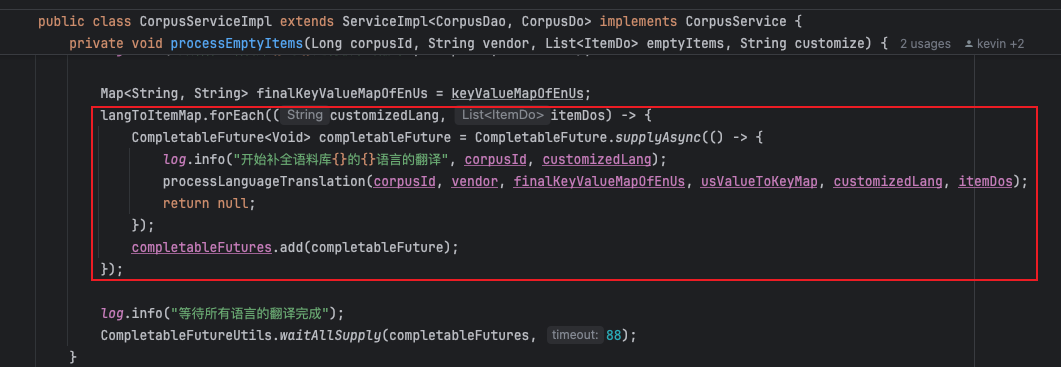
2、查看项目代码,可以看到这个接口确实有多线程并发写数据库的操作,导致了死锁。
根因分析
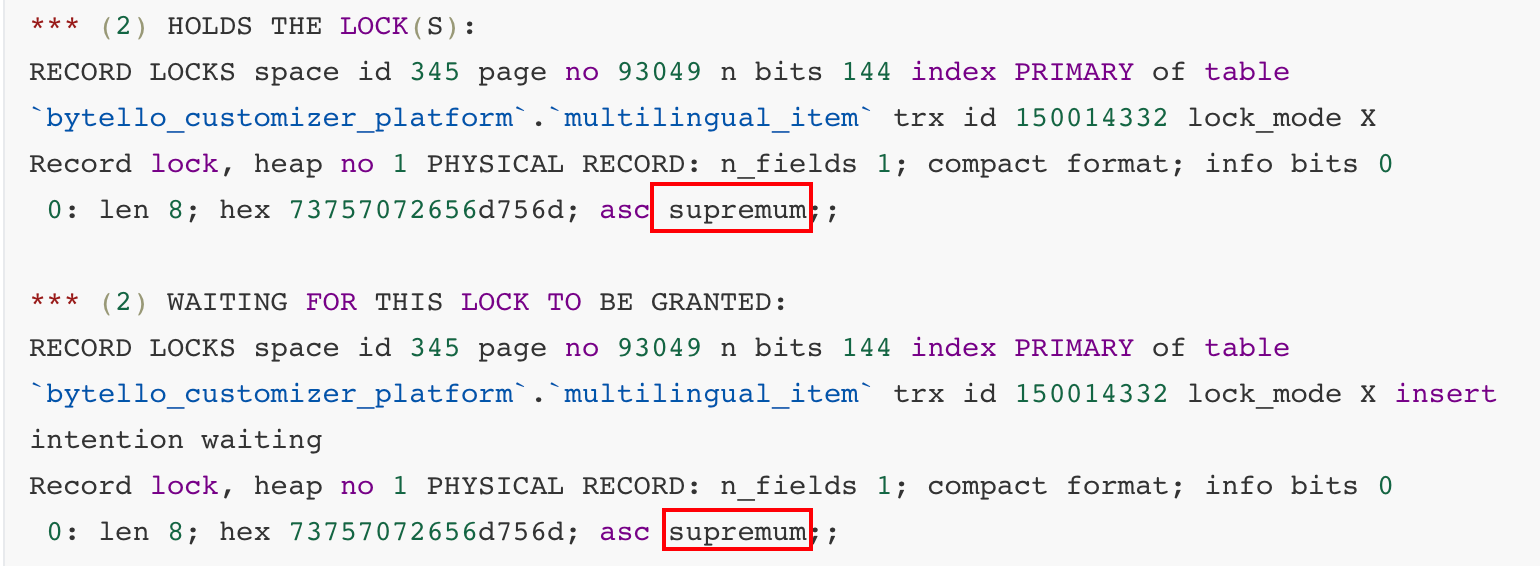
1、有个明显的问题,两个事务是针对两门不同语言的插入更新,为什么会争同一个锁?我们可以看到两个事务都有一个supremum 记录锁,为什么会这样大范围加锁?
supremum记录:InnoDB索引页中的虚拟最大记录(逻辑上界),代表“大于该页所有实际记录的范围”(例如,页内实际记录是id=100、200、300,supremum就是>300的虚拟边界)。
2、查看相关资料,发现官方有一个说明,原因是为了解决更严重的数据一致性问题,引入了 supremum 记录锁,同时也引入了并发死锁的问题。可以参考 https://bugs.mysql.com/bug.php?id=98324 里 Jakub Lopuszanski 给出的解释。
假设有一个表:
create table t1(
  f1 int auto_increment primary key,
  f2 int unique key,
  f3 int
);
并且其中有一行数据: (1, 10, 100)
假设有两个并行的事务:
事务 1:
begin;
insert into t1 values (2, 10, 200) on duplicate key update f3 = 120;
commit;
事务 2:
begin;
insert into t1 values (2, 20, 300) on duplicate key update f3 = 500;
commit;
数据库的最终状态是什么?在修复这个 bug 之前,结果是不确定的。
如果事务 1 先执行,那么事务 1 会在 f2=10 上看到冲突,因此将唯一的一行更新为 (1, 10, 120)。然后事务 2 会看到没有冲突,并插入 (2,20,300),所以最终状态将是:
(1,10,120)
(2,20,300)
如果事务 2 先执行,首先,事务 2 的插入操作会看到没有冲突,并插入 (2,20,300)。然后事务 1 会看到冲突,但这次是在 f1=2 上,因此它会决定冲突的行是 (2,20,300),并将其更新为 (2,20,120),所以从库上的最终状态将是:
(1,10,100)
(2,20,120)
这个结果非常糟糕,不是我们期望的。最终官方采用了加锁的方式解决这个问题,但同时也引入了死锁的问题。
画个图帮助理解:
sequenceDiagram participant T2 as 事务2 participant DB as 数据库 participant T1 as 事务1 Note over DB: 初始数据: (1, 10, 100) T2->>DB: INSERT (2, 20, 300) ON DUPLICATE KEY UPDATE f3=500 Note right of DB: 检查约束冲突 Note right of DB: 无冲突,直接插入 DB-->>T2: 插入新记录 (2, 20, 300) T1->>DB: INSERT (2, 10, 200) ON DUPLICATE KEY UPDATE f3=120 Note right of DB: 检查约束冲突 Note right of DB: f1=2 冲突!(与T2插入的记录) DB-->>T1: 更新T2的记录 (2, 20, 300) → (2, 20, 120) Note over DB: 最终状态:
(1, 10, 100)
(2, 20, 120)
MySQL 的修复策略
1、锁定所有可能的冲突点 - 不仅锁定实际冲突的记录,还锁定所有可能冲突的位置
2、引入 Supremum 记录锁 - 确保插入操作的串行化
3、保证可串行化 - 确保无论执行顺序如何,结果都是一致的
总结
1、不是代码bug:这是 MySQL 为了修复更严重的一致性问题而引入的必要机制,所以这是预期行为,需要在应用层面处理。
2、Supremum 记录锁:所有 INSERT … ON DUPLICATE KEY UPDATE 操作都需要获取这个锁
3、死锁是副作用:为了保证数据一致性,MySQL 宁愿承受更多死锁的代价
解决方案
避免并发执行INSERT … ON DUPLICATE KEY UPDATE 语句,并发翻译所有语言,全都翻译完成之后,再合并为一个事务去写数据。